In today’s digital workspace, collaborative editing tools are vital for enhancing productivity. These tools enable multiple users to create, edit, and share documents in real time, making them ideal for both remote teams and classroom settings.
This guide to collaborative editing tools provides a comprehensive overview of their features and benefits. You will find insights into popular tools available in 2024, along with helpful tips for choosing the right one to meet your needs and improve your workflows.
Explore how these tools can elevate teamwork and boost efficiency in your projects!
What Are Collaborative Editing Tools?
Collaborative editing tools are software applications that enable multiple users to edit and create documents simultaneously in real-time. These tools are essential for teams working together, regardless of their physical locations. As remote work continues to rise, their importance in today’s workflows cannot be overstated.
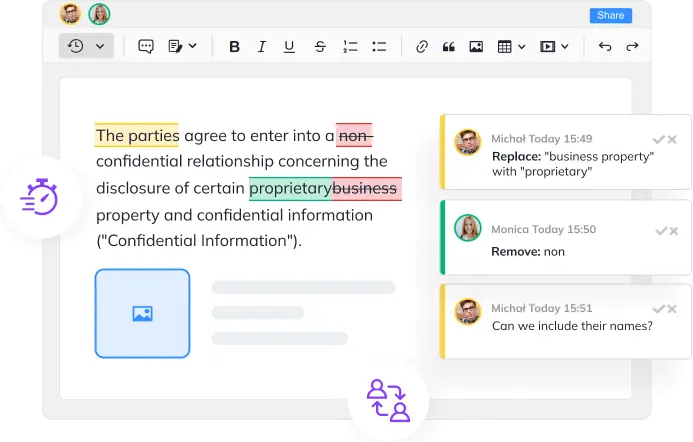
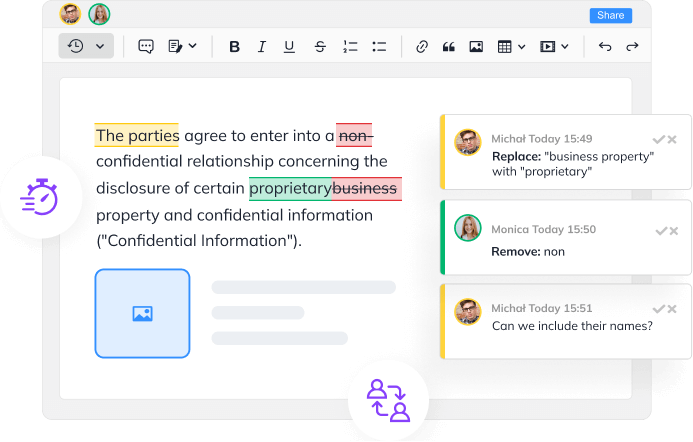
These tools come with several key features, such as version control, change tracking, commenting, and instant notifications. Version control allows users to revert to previous document versions, preventing potential loss of edits. Change tracking highlights individual contributions, fostering accountability among team members.
In a dynamic work environment, collaborative editing tools significantly enhance workflow efficiency. They improve team communication while reducing the need for lengthy email exchanges. Research shows that around 70% of professionals find these tools facilitate better idea sharing and teamwork, leading to increased productivity.
Furthermore, these tools serve not only document editing purposes but also act as a central hub for knowledge sharing and project management. This capability promotes alignment among team members and nurtures a culture of collaboration.
Having explored the essence of collaborative editing tools, the following section will delve into their benefits for teams and organizations, highlighting their crucial role in modern workspaces.
Benefits of Collaborative Editing Tools
Collaborative editing tools significantly enhance teamwork by eliminating geographical barriers and improving communication. They enable multiple users to edit a document simultaneously, facilitating a dynamic exchange of ideas and diverse contributions.
A standout feature of these tools is real-time editing and feedback, which not only fosters creativity but also allows for quick issue resolution. As a result, teams utilizing collaborative editing tools can see a 20% increase in productivity through enhanced collaboration.
Another essential aspect is version control and document security. These tools make it simple to track changes, allowing users to revert to earlier versions while secure in the knowledge that all contributions are retained. With 54% of employees citing security concerns, it’s crucial to choose platforms with robust safety measures to protect sensitive information.
Moreover, collaborative editing tools effectively track changes, ensuring accountability and facilitating efficient management of edits while providing a clear project timeline. By recognizing these benefits, teams can better select the right collaborative editing tools for their specific needs.
Key Features of Collaborative Editing Tools
As teams increasingly rely on collaborative editing tools, understanding their key features is essential for boosting productivity. These tools foster interaction and streamline workflows, making collaboration more effective.
One primary feature is real-time collaboration, which enables multiple users to edit the same document simultaneously. Immediate updates are visible to everyone, enhancing productivity and encouraging dynamic idea sharing.
Document version control is another crucial aspect. Quality tools provide detailed change histories, allowing users to review past versions and revert to them if necessary. This feature promotes accountability and preserves the integrity of content, particularly when multiple team members are involved.
User access and permissions management are vital for maintaining security. Teams need to control access levels to protect sensitive information while allowing contributions from editors. This balance is essential for effective collaboration.
Furthermore, commenting and feedback features improve team communication. Users can provide input, ask questions, or suggest changes directly within the document, ensuring a smooth review process and capturing all feedback effectively.
Lastly, integration with other platforms enhances seamless workflows. Leading collaborative editing tools connect with project management and communication software, reinforcing productivity through a unified approach.
Selecting the right collaborative editing tool is crucial for enhancing teamwork and driving project success. Next, we will explore the best options for 2024 that include these essential features.
Top Collaborative Editing Tools for 2024
Selecting the right collaborative editing tools is crucial for enhancing productivity and creativity within teams. Below, we highlight the top options for 2024, showcasing their key features and benefits.
Google Docs stands out with its intuitive interface and real-time editing capabilities. It enables multiple users to edit simultaneously while tracking changes via version history. Additionally, the built-in commenting system allows users to give specific feedback on text.
Microsoft Word Online combines robust editing features with effective collaboration. Users can co-author documents in real time and work with various file formats, thanks to its seamless OneDrive integration that facilitates easy file sharing across devices.
Notion provides a versatile workspace ideal for collaborative note-taking, task management, and project planning. Its database features help teams organize information effectively and create visually appealing documents quickly.
Quip focuses on team collaboration by merging documents and spreadsheets. This tool allows seamless updates and includes integrated chat for real-time discussions about content changes.
Dropbox Paper allows teams to collaborate in creating and editing documents. With its minimalist design promoting creativity, it also features task management tools that help monitor project progress and easily embed multimedia elements.
Zoho Writer provides a classic word processing experience paired with collaborative tools. It facilitates teamwork through document reviewing and commenting features, streamlining the feedback process.
Figma, primarily known as a design tool, also supports collaborative editing. It allows multiple users to collaborate on design documents, with commenting features that enable discussions among design teams.
When selecting a collaborative editing tool, consider your project needs, the necessity for real-time collaboration, and integration with existing workflows. Each tool offers unique features tailored to various collaborative requirements, ensuring a good fit for your team.
In the next section, we will examine important criteria to guide your choice of the ideal collaborative editing tool based on your project and team dynamics.
Choosing the Right Collaborative Editing Tool
With the rise of remote and hybrid work, selecting the best collaborative editing tools is crucial. To find the right fit for your workflow, consider several key factors.
First, assess your team size and collaboration needs. Tools designed for small teams may lack essential features for larger organizations, such as advanced permissions and document management. Understanding your team’s dynamics will guide your decision.
Next, examine the available software features and integrations. Look for collaborative editing tools that offer real-time editing, version control, and user management. Integrations with your current project management or communication tools can significantly enhance productivity.
Cost is also an important consideration. While some collaborative editing tools provide free versions, these may have limited features. Compare subscription plans and features to ensure you select a tool that meets your needs without unnecessary expenses.
User experience plays a vital role in adoption. An intuitive interface encourages use, while a complicated system can lead to frustration. Choose tools with clear navigation and consider the availability of training resources to ease the transition for your team.
Lastly, ensure compatibility with existing tools for a seamless transition. Select collaborative editing tools that work well with your cloud storage and communication platforms to enhance workflow efficiency.
In summary, finding the right collaborative editing tools involves analyzing team needs, features, costs, user experience, and compatibility. By carefully considering these factors, organizations can improve collaboration and productivity.
As you make your decision, think about how these tools will integrate with your systems to maximize efficiency, which leads us to our next section on integrating collaborative editing tools with existing systems.
Integrating Collaborative Editing Tools with Existing Systems
Integrating collaborative editing tools into current workflows is crucial for organizations that seek to enhance productivity and teamwork. When these tools work seamlessly with existing systems, they enable users to improve their processes through features like real-time editing, version control, and enhanced communication.
Plugins such as LoopIndex facilitate smooth workflows by enabling consistent interactions with popular document editors. This integration allows teams to collaborate on projects without the hassle of switching between different platforms, ensuring that everyone has access to the most recent versions and can contribute easily.
Systems like TinyMCE, Froala, and CKEditor 4 effectively support real-time collaboration. They enable multiple users to edit documents simultaneously, minimizing conflicts and providing a unified space for communication and creativity. This integration not only saves time but also elevates the quality of work, as teams can brainstorm and refine ideas together in real-time.
Moreover, enhanced collaboration through these integrated systems accelerates project turnaround times. With shared documents available instantly, team members can provide immediate feedback and make swift adjustments, which streamlines decision-making and keeps projects on track.
When selecting and implementing collaborative editing tools, it’s important to consider how these integrations can improve communication and connectivity within your teams. The true value of collaborative editing tools lies not just in their features, but in their compatibility with existing organizational systems.
Best Practices for Using Collaborative Editing Tools
To enhance productivity with collaborative editing tools, it’s essential to follow a few best practices. First, establish clear communication guidelines. Open dialogue creates a framework for team interactions, so decide whether to use the editing tool’s features or rely on external messaging apps.
Next, define roles within the team to streamline the editing process. Assign responsibilities, such as lead editor or contributor. This clarity reduces confusion and overlap in tasks.
Regularly review document changes to keep everyone informed. Scheduling check-ins or feedback sessions helps discuss modifications and maintain team alignment.
Providing training and support for users is also important. Offering tutorials and help documents can minimize mistakes and improve efficiency for newcomers.
Finally, implement robust security measures. Utilize user permissions and encryption to safeguard sensitive information, and conduct regular audits to address potential threats.
By incorporating these best practices, teams can leverage collaborative editing tools effectively, leading to improved productivity and successful projects.
Conclusion
This guide explores collaborative editing tools, emphasizing their importance in enhancing teamwork and productivity. We discussed their definitions, benefits, key features, and reviewed the top options for 2024. Additionally, we provided helpful tips for selecting a tool that meets your needs and works well with your existing systems.
Now is the time to take action. Whether you’re part of a small team or a large organization, the right collaborative editing tools can transform your workflow. Review the options in this guide to improve your collaboration today!
Using the right tools effectively is vital for boosting collaboration. By incorporating collaborative editing tools, you can streamline your processes and create a cooperative environment that encourages success.
About LoopIndex LLC
LoopIndex LLC specializes in enhancing content creation and editing through robust plugins for popular editors like TinyMCE, Froala, and CKEditor 4.
By streamlining the document editing process, LoopIndex empowers teams to collaborate efficiently while maintaining version control and accountability, making it essential for businesses and professionals aiming to improve their document workflows.
Discover how LoopIndex can transform your editing experience today!