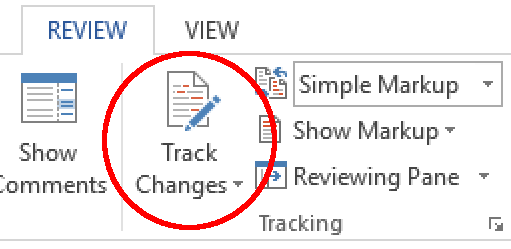
In today’s world of remote work, knowing how to track changes is key for good collaboration. Whether it’s updating documents, co-authoring papers, or reviewing proposals, keeping tabs on edits enhances workflow. This post will discuss why tracking changes is important in document work, including important features to consider, and how to make document tasks easier using suitable plugins and tools.
We will show you how to track changes in shared software and give tips for how to use these tools properly, helping you tackle issues that come up when several people contribute. By reading this article, you will grasp how to track changes and better create a collaboration space that boosts productivity and understanding. Let’s begin and discover how to achieve smooth document work!
Why Track Changes Matter in Document Collaboration
In document collaborations, track changes is critical for clear communication. With many contributors, edits and annotations can create confusion. The track changes feature provides a systematic way to review modifications. Thus, ensuring all contributions are visible and recognized.
Also, using track changes promotes accountability among team members. Each edit is linked to its author. This fosters a culture that respects the work of others. Everyone can see what has changed and who made those changes. This is especially important in larger groups working together.
Furthermore, another key benefit of track changes is improved feedback management. In processes like drafting or revising reports, input from many people leads to extensive discussions. Track changes allows comments directly on the document. This enhances feedback without messy email threads, thus simplifying suggestions implementation.
With the rise of collaborative tools for remote work, knowing how to use track changes is crucial. Navigating changes smoothly can boost team productivity and lead to better results.
Next, we will discuss essential features of track changes for better document management.
Essential Features of Track Changes
Using track changes is important for collaboration. This tool helps with editing by showing the changes. Teams can work together better with this functionality. Below are the features that make track changes crucial for document editing:
Revision History: Track changes keeps a record of all edits in a document. Users can go back to earlier versions if needed. This feature prevents losing important details and acts as a safety net during editing.
Commenting Tools: Users can add comments next to their changes. This allows explaining or suggesting improvements without changing the main text. This part encourages dialogue within the team, leading to better conversations about the edits.
Markup Options: Track changes gives different markup styles for editing actions. Users can pick styles like strikethroughs or highlighting. This helps show deletions or modifications, making contributors’ changes clear.
Color-Coding and User Identification: Users can get specific colors for their edits, making it easy to see who made which changes. This feature boosts collaboration by clarifying contributions and minimizing misunderstandings.
Customization Settings: Track changes can be adjusted to the needs of users or teams. Settings can turn features on or off, changing how edits show up. It enhances user experience and allows teams to work as they want to.
Using these features in your document work can increase productivity and clarity. Visualizing revisions and allowing for open feedback helps teams integrate their work while preserving the quality of the final document. As we move to the next section, consider how plugins can improve these workflows, making the most of track changes.
Streamlining Document Workflows with Plugins
In today’s work environment, the ability to track changes is vital for document collaboration. Plugins from LoopIndex LLC improve the built-in track changes features of popular editors, enhancing workflows for teams. These plugins add needed functionalities while working well with existing tools to help users increase productivity without much training.
One big advantage of LoopIndex LLC’s plugins is quicker document reviews. Organizations using these plugins report a 30% drop in time for document revisions. This speed comes from interactive interfaces that let team members communicate and work together better. Using real-time collaboration helps users address feedback quickly and make decisions, thus improving workflow.
Additionally, LoopIndex LLC’s plugins work well with tools like Google Docs and Microsoft Word. This means users can have an enhanced collaborative experience without switching between platforms. Consolidating editing, reviewing, and feedback into one system helps teams stay focused throughout projects. This cuts down miscommunication and allows for better tracking of changes during work.
As we explore the world of collaboration tools, it’s clear that special plugins change how teams manage documents. These streamlined processes lead to innovative, more efficient collaboration, making it easier for teams to track changes while also improving productivity and output quality.
Tracking Changes in Collaborative Software
In the fast-paced digital work place, tracking changes within collaborative software is key. Tools like Git and SharePoint show how crucial tracking modifications is for visibility in document edits and version histories. Git is used in software development. It lets teams see changes in source code, so many developers can work together on projects without overwriting each other. This system helps accountability and improves collaboration. It is easier to revert to past versions when needed.
SharePoint is known for collaborative document management. And it integrates track changes features to help teams work well together. With a clear version history, users can identify who made changes and when. This allows for better communication within teams. The use of track changes in such platforms does boost collaborative culture; it fosters trust among team members.
Many tools add track changes to allow for better document management. Google Workspace provides a simple way to track alterations live, while Microsoft Word includes advanced track changes options for detailed reviews. These features help streamline communication. All comments and edits are recorded, making it easy for collaborators to access everything.
Good practices using track changes can improve team work. It is essential to set clear rules about how and when to track changes. Team members need training on how to use the tools’ features. Regular reviews or meetings contribute to a better feedback loop; allowing teams to talk about issues and celebrate progress.
With strong implementation of track changes in collaboration software, teams can boost efficiency and quality of output. A clear way to manage document changes keeps everyone aligned, leading to more effective teamwork.
Implementing Collaboration Tools Effectively
In today’s fast-moving business world, collaboration is key. The track changes feature plays a vital role in this process. To integrate track changes in business settings, organizations must follow best practices to ensure teams use this tool with ease.
First, its essential for team members to know how the track changes feature works. Training sessions can help users learn to use this tool well. Studies have shown that 70% of employees feel more confident after proper training on collaboration tools. So, investing time in training on track changes is crucial.
Next, it helps to create an environment that encourages open communication. Feedback and discussions on tracked changes can clarify intentions and enhance document quality. For example, a case study showed teams with regular check-ins on revisions experienced a notable increase in efficiency.
To effectively integrate track changes into workflows, organizations need solid planning. They should review current practices and determine how track changes aligns with their goals. Tools like Microsoft Word and Google Docs support varied integration levels. Choosing tools that enhance track changes and improve workflow matters.
Also, continuous support is essential for users. A support system enables employees to address issues and maximize the use of collaboration tools. Access to support can boost productivity, letting teams focus on collaboration rather than software problems.
Lastly, it’s important to monitor the performance of these tools. Gathering user feedback and analyzing statistics helps organizations refine their strategies. Such an approach will ensure track changes adapt to the team’s growing demands.
As organizations enhance their document collaboration with track changes, they can tackle common issues. Next, we will discuss these challenges and ways to improve collaboration further.
Overcoming Common Challenges with Track Changes
Track changes is very useful in team document editing. However, teams often meet challenges that hurt their productivity and clarity. Pinpointing these problems is key for good document teamwork.
One big problem is when edits overlap. When many members edit the same document at once, it can create confusion and conflicting edits that make review harder. Managing overlapping edits means establishing clear revision rules. By defining who works on which parts or ideas, conflicts can be lessened. Also, real-time tools help users see changes as they happen, allowing for better communication.
Another issue is keeping feedback consistent. When many reviewers use track changes, different feedback styles can confuse everyone. To fix this, teams should use a standard feedback format. This could mean specific ways for suggesting changes, like comments for questions and track changes for real edits. Training on these rules makes sure all members stay aligned.
Strong revision guidelines are crucial, since about 70% of collaborative projects do not meet deadlines due to poor communication. Setting these rules gives team members clearer expectations, thus lowering misunderstandings and improving teamwork.
Finally, hold regular review meetings where members can discuss edits together. This clears up confusion and promotes a conversation about changes. It builds the project’s collaborative spirit.
Conclusion
In conclusion, knowing how to use track changes important for enhancing teamwork. We discussed why track changes matter in document work. The key features make it an essential tool for teams. From better document flows via plugins to efficient collaboration tools, all parts ensure your teams work well together.
You now have info on how to use track changes and deal with problems. Put this info to work now. Start to integrate track changes into your daily tasks. This can change how your projects turn out. Use these tools. Watch your team’s work rate go up.
The secret to good teamwork is using track changes smartly. Take these steps to ensure better collaboration and results. So, do not wait- use what you know. Change the way your team works together today!
About LoopIndex LLC
LoopIndex LLC specializes in enhancing content creation and editing through robust plugins for popular editors like TinyMCE, Froala, and CKEditor 4.
By streamlining the document editing process, we empower teams to collaborate more efficiently, maintain version control, and ensure accountability while handling complex documents.
Discover how you can improve your document workflows today at LoopIndex.com!