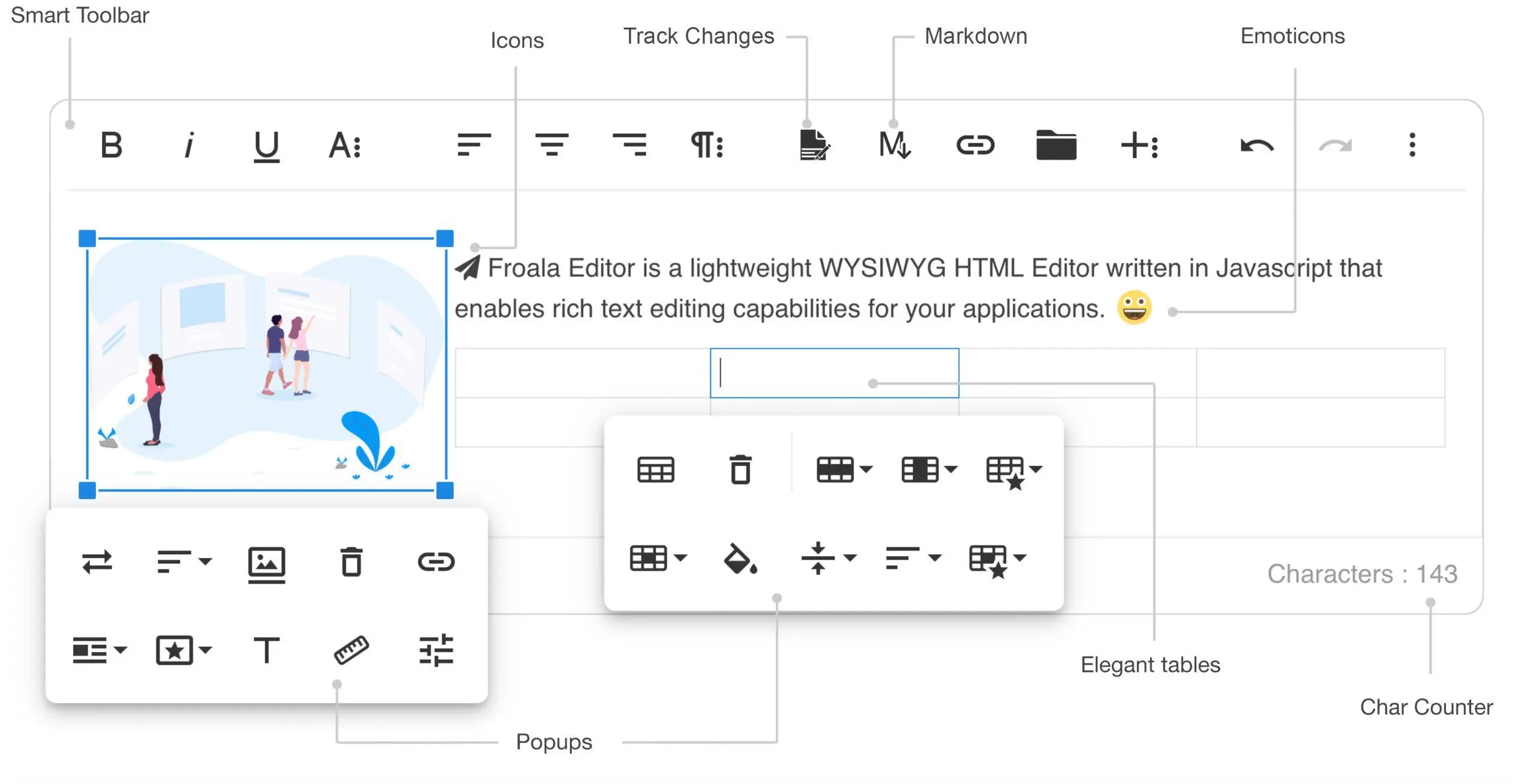
You’ve come to the right place if you’re curious about Froala Editor plugins and want to enhance your web projects. This guide introduces you to the essentials of Froala Editor plugins, detailing their functionality and benefits. Whether you’re a developer focused on user experience or looking to expand your text editor capabilities, understanding these plugins is crucial.
This post will review various Froala Editor plugins, showcasing some popular options and providing installation guidance. You will discover their advantages, such as easy integration and customization tailored to your needs. By the end of the guide, you’ll have the insights necessary to utilize Froala Editor plugins and create engaging content effectively. Let’s dive into the potential these powerful tools hold!
Overview of Froala Editor Plugins
Froala Editor plugins are essential extensions that enhance the capabilities of the Froala WYSIWYG text editor. These plugins enable developers and users to incorporate specific functionalities tailored to their editing needs, transforming the Froala Editor from a simple tool into a powerful platform.
One of the primary advantages of using Froala Editor plugins is their customization level. With over 30 official plugins available, users can seamlessly enhance the editor’s features. These enhancements support various media types, create rich content formats, and improve the user interface, making content management smoother. For example, plugins facilitate spell-checking, streamline image handling, and allow customizable toolbars, significantly enriching user interaction.
The importance of utilizing plugins in the Froala Editor cannot be overstated. They boost workflow efficiency and enable users to tailor their editing experience to suit individual and team requirements better. As the demand for personalized content management solutions grows, effectively using these plugins gives teams a competitive advantage in optimizing digital content creation.
This guide will explore popular Froala Editor plugins that can significantly enhance your text editing experience.
List of Popular Froala Editor Plugins
Froala Editor’s strong plugin ecosystem greatly enhances the content creation experience. Notable plugins include the Image Manager, which allows users to upload, edit, and manage images directly within the editor. The Video Embed plugin makes adding videos from platforms like YouTube and Vimeo straightforward, further enriching multimedia content. Additionally, the File Upload plugin facilitates seamless sharing of documents and files.
For those seeking advanced customization, the Code View plugin enables direct HTML editing, ensuring accuracy. Users can also use the Links plugin to add hyperlinks to improve quick navigation to external sources. Lastly, the Table Plugin helps create and manage tables, making data presentation more precise.
Overall, the diverse range of over 20 Froala Editor plugins caters to various content needs, benefiting developers and content creators. In the next section, we will discuss how to install Froala Editor plugins effectively for optimal use.
How to Install Froala Editor Plugins
Installing Froala Editor plugins is straightforward and can significantly enhance text editing capabilities. Following these simple steps, you can easily integrate Froala plugins into your project.
Start by downloading the plugin files from Froala’s official website, typically in a zipped format.
Next, extract the files and organize them in your project folder to maintain a clear directory structure for future reference.
In your HTML code, link the plugin scripts and styles in the head section or before your main JavaScript file to ensure they are correctly loaded.
When initializing the Froala editor in your JavaScript, specify the desired plugins using the pluginsEnabled option. For example, use pluginsEnabled: ['image', 'link'] to include the image and link plugins.
Check your configuration and compatibility. Ensuring the settings and plugin compatibility is crucial to preventing conflicts when using the editor.
After you’ve completed the setup, create a Froala Editor instance to test the installation and explore the newly available features.
If you encounter issues, troubleshoot by checking for console errors, confirming that file links are accurate, and examining any plugin dependencies.
Adhering to these guidelines will help you successfully integrate Froala Editor plugins into your projects, significantly improving the editor’s functionality.
Benefits of Using Froala Editor Plugins
Froala Editor plugins significantly enhance the user experience by adding essential features that the core editor may lack. These plugins simplify complex tasks, allowing users to easily incorporate rich media, advanced formatting, or unique design elements. This customization is vital for transforming content creation and management.
Users can tailor the Froala Editor to suit their workflow needs with an extensive array of plugins. Whether creating a blog post or developing a complex web application, users can choose plugins that align with their project requirements. For instance, SEO optimization plugins can enhance online visibility and boost content performance.
In addition to expanding functionalities, Froala Editor plugins facilitate seamless integration into existing systems. Companies can customize the editing environment to reflect their branding and user preferences, significantly improving productivity. This flexibility in adapting the interface and functions streamlines content creation and boosts overall efficiency.
Moreover, Froala Editor plugins are designed for easy installation and integration. Users can fully leverage these features without requiring extensive technical skills, empowering them to maximize the Froala Editor’s capabilities regardless of their coding knowledge.
The following section will explore various integrations and use cases for Froala Editor plugins, highlighting their effectiveness and versatility across different scenarios.
Integrations and Use Cases of Froala Editor Plugins
Froala Editor plugins enhance web content management and play a significant role in various industries. They streamline workflows and improve user experiences, making them indispensable for businesses, especially in e-commerce and education.
In the e-commerce sector, Froala plugins enhance product pages by allowing the integration of rich media, like images and videos. This makes product descriptions more appealing and increases customer engagement by up to 50%. Moreover, real-time chat and feedback plugins facilitate customer interaction, significantly boosting conversion rates.
Meanwhile, Froala’s collaborative features support interactive content creation in the education sector. For instance, the Checklist plugin enables teachers and students to develop interactive checklists, leading to better project management and improved learning outcomes. Studies indicate that these tools can enhance group project completion rates by 30%.
The technology industry also benefits from Froala Editor’s seamless compatibility with development frameworks. This integration allows teams to improve content editing processes without disrupting existing systems. The plugins connect easily to APIs, providing an enriched editing experience while keeping performance intact.
Furthermore, Froala plugins are beneficial for blogging and content marketing efforts. They assist in formatting articles, adding SEO metadata, and enabling social media integrations. When used effectively, social sharing plugins can increase website visits by up to 20%.
These diverse integrations showcase the versatility of Froala Editor plugins. As organizations witness these advantages, it’s clear that Froala’s tools significantly enhance productivity and drive innovation.
The next section will explore how to customize Froala Editor plugins for an even better content editing experience.
Customizing Froala Editor Plugins
To effectively customize Froala Editor plugins for your project needs, it’s crucial to understand the methods available for modification. The editor’s design allows developers to alter plugins to meet specific requirements, including adjusting the editor’s appearance, adding features, or enhancing functionalities.
One primary approach to customizing plugin appearance is through CSS. Developers can style the editor’s toolbar and UI components, aligning them with their application’s branding. In addition, JavaScript provides an avenue for modifying plugin behaviors, allowing enhancements to functionality without altering the core codebase.
The Froala API plays a significant role in supporting these customizations. It enables developers to enable or disable plugins based on user interactions, tweak plugin options, or even create new plugins that integrate seamlessly with existing ones. This flexibility facilitates aesthetic improvements and supports the creation of a personalized user experience tailored to specific scenarios or business goals.
Moreover, it’s possible to set custom properties for plugins, allowing for detailed adjustments like defining allowed formats, establishing custom commands, or designing specialized toolbars. Such configurations empower users with the right tools for their tasks, resulting in enhanced efficiency and satisfaction.
In summary, Froala Editor plugins unlock extensive customization capabilities that are suitable for various project demands. By leveraging these options, developers can build robust, user-friendly editing solutions that excel in functionality and design. Next, we will explore the support and resources available to developers and users, as accessing the proper assistance can significantly enhance both the development experience and the effective utilization of the editor’s features.
Support and Resources for Froala Editor Plugins
Access to quality support and resources is essential for effectively using Froala Editor plugins. The extensive documentation provided by the Froala community equips users with the knowledge to harness the full potential of the editor’s features.
This documentation contains detailed guides covering installation, configuration, and each plugin’s functionalities. It encompasses basic and advanced topics, ensuring users can maximize their plugin experience.
In addition to official resources, a variety of developer tools, such as code samples, FAQs, and troubleshooting tips, are available. These resources further assist users in optimizing their use of Froala Editor plugins and help ease the learning process.
Community support also plays a significant role. Users can connect through forums and social media groups to share insights, ask questions, and collaborate with fellow developers. This interaction enhances the user experience and fosters the sharing of best practices.
Overall, Froala provides a wealth of support and resources. Users can elevate their experience with Froala Editor plugins by engaging with documentation and the community.
Conclusion
This guide covers the essential features of Froala Editor plugins, focusing on their purpose, installation process, and benefits. We explore popular plugins that enhance your editing experience and provide insights into their integration and use cases. Additionally, we discuss customization options that allow you to tailor the editor to your specific needs.
With a clear understanding of Froala Editor plugins, you are now ready to apply this knowledge. Experimenting with various plugins that align with your projects can help streamline your workflow and amplify your content creation efforts.
By delving into Froala Editor plugins, you can elevate your editing skills and craft more engaging content. The right tools can greatly enhance your productivity and creativity. Take the time to explore the functionalities of Froala Editor plugins and unlock your full potential!
About LoopIndex LLC
LoopIndex LLC enhances content creation and editing through robust plugins for popular editors like TinyMCE, Froala, and CKEditor 4.
Focusing on streamlining the document editing process, LoopIndex empowers teams with improved collaboration, version control, and accountability, making it an essential resource for businesses and professionals aiming to enhance their document workflows.
Explore our solutions today and transform your document editing experience!