Does your shared drive look like a graveyard of files named final_v2.docx, report_FINAL_for_real.docx, and contract_janes_edits_v4.docx? If so, you’re definitely not alone. This kind of file chaos is a classic sign of teams struggling to collaborate, and it’s a recipe for wasted time, frustrating rework, and costly mistakes.
Document version control is the systematic approach that tames this madness, creating a clear, manageable history of a document’s life.
Escaping the Chaos of ‘Final_v2_FINAL.docx’
We’ve all been there-that sinking feeling as you hunt through a dozen nearly identical files, trying to figure out which one is the actual final version. It’s more than just a minor headache; it’s a hidden tax on your team’s productivity. When collaboration is a free-for-all of saving new copies, people spend precious time just trying to find the real “source of truth.”
This manual process is a breeding ground for human error and throws a wrench into any workflow.
The image above perfectly captures the stress that comes from disorganized file systems. It’s this exact frustration that pushes organizations to finally adopt a structured version control system.
The Real Cost of Poor Document Management
Without a system, the fallout is real. Projects get delayed because team members accidentally work from outdated drafts. People waste hours redoing work that was already completed in another version. The business impact can be huge.
The statistics are eye-opening. A staggering 90% of businesses struggle with versioning issues. Nearly half (47% of employees) admit to working on the wrong document version, sometimes for days at a time. And 59% of team members say they’re frequently blocked, just waiting for a colleague to finish their edits on the one “master” file.
A messy shared drive isn’t just a nuisance-it’s expensive. Every hour spent searching for the right file or redoing work is a direct hit to your bottom line and your team’s morale.
Finding a Single Source of Truth
At its core, the problem is the lack of a single, reliable source of truth. Version control fixes this by establishing a central, authoritative history for every document. Instead of spawning a new, conflicting file with every save, it creates a clean, chronological log of every change.
For teams looking to get this right, following established document version control best practices is a great starting point. A key part of any good system is the ability to https://www.loopindex.com/track-changes/, turning a chaotic process into a clear and organized one. Once you understand the “why” behind it, it’s easy to see how version control brings clarity to the chaos.
A Time Machine for Your Documents
So, what exactly is document version control? Forget the jargon for a moment and picture a time machine for your content. It’s not just about saving copies; it’s about creating a detailed, chronological story of every single change-who made it, when they made it, and why.
This process builds an unbreakable chain of custody for your document. Think of it like a meticulous logbook rather than just a folder of backups. Each entry is a specific, recorded change, giving you a complete narrative of how a document evolved from a rough first draft into its final, polished state.
Creating a Single Source of Truth
The end goal here is to establish a single source of truth. When your entire team works from one authoritative document, the chaos just melts away. No more hunting for the “latest” version in a dozen different email threads or wondering if you’re editing an outdated copy.
This isn’t just a nice-to-have anymore; it’s becoming essential. The need for clear audit trails and compliance-ready workflows is pushing this technology forward. In fact, the market for Document Version Control Software hit $1.2 billion in 2024 and is expected to grow at a 12.5% CAGR through 2033. This growth is overwhelmingly driven by SaaS platforms and companies that can’t afford to guess about their document history. You can dig into the numbers in the full market research report.
This kind of system allows teams to collaborate fearlessly. Anyone can jump in, suggest an edit, or add a comment, knowing that their work won’t accidentally be overwritten or lost forever.
Version control is the safety net that makes collaborative content creation possible. It ensures that every contribution is captured and that you can always rewind the clock to a previous state if something goes wrong.
Beyond Simple File Saving
It’s really important to draw a line between this and the basic “version history” you find in many cloud storage tools. While those features are handy, they often lack the structured, review-focused tools needed for serious professional work. A proper document version control system brings much more to the table.
-
Granular Tracking: It captures every tiny change-a single word, a comma-not just periodic saves.
-
Explicit Actions: It’s built around intentional steps like “proposing a suggestion” or “accepting an edit,” which creates a real workflow.
-
Complete Accountability: It logs who did what and when, building a permanent audit trail that can’t be altered.
At its core, this approach turns a document from a static file into a dynamic project with a transparent and complete history. That’s the real difference between a simple save feature and a professional system built for high-stakes collaboration.
The Core Tools That Power Smart Collaboration
To really get what document version control is all about, we need to look under the hood at the features that transform a simple file into a living, breathing collaborative space. These aren’t just fancy add-ons; they’re the engine that drives modern teamwork. They bring clarity, accountability, and a whole lot of control to the entire process of creating content.
Each tool has a specific job, and they all work together to kill the guesswork and make the review cycle a whole lot smoother. Let’s break down the essential pieces that make this kind of smart collaboration a reality.
This diagram shows how version control systems track history, manage edits, and keep collaborators in sync to create one reliable source of truth.
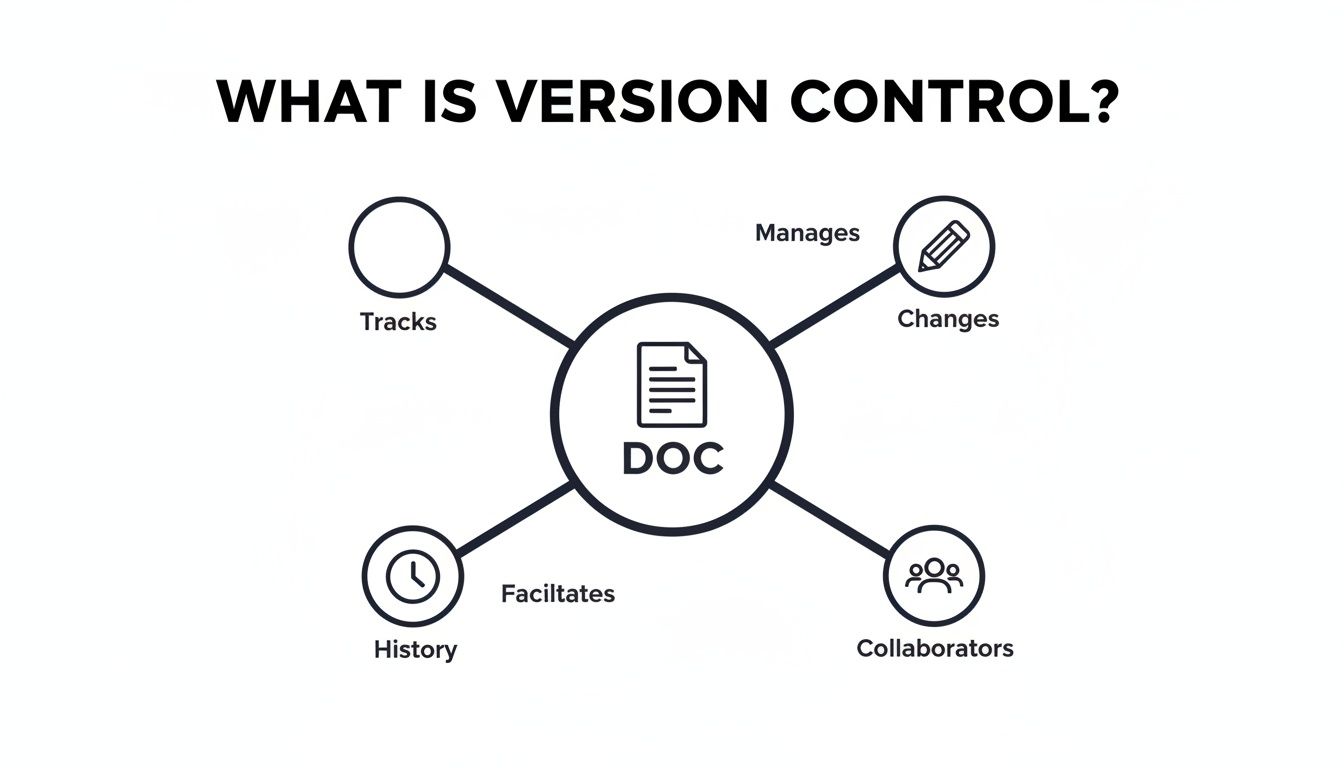
As you can see, keeping a complete historical record is just one piece of the puzzle. Tracking who changed what and when is just as crucial.
Proposing and Reviewing Edits
The ability to suggest changes without blowing up the original text is the heart of any good collaborative workflow. This is where Track Changes (or suggestions) shines. Instead of firing off an email with a list of notes, a reviewer can just propose an edit right there in the document.
This creates a clean, visual cue-often highlighted in a different color-showing exactly what’s being proposed. It’s a non-destructive way to give feedback, which means the original author always has the final say.
For bigger, more complex revisions, Diffs are a lifesaver. This feature gives you a side-by-side comparison of two versions, instantly highlighting every single addition, deletion, and tweak. It makes spotting what’s different between drafts incredibly easy.
A powerful version control system moves beyond simple feedback. It provides a structured, auditable framework for proposing, discussing, and finalizing content changes with complete transparency.
This structured review process is a massive pain point for a lot of teams. A 2023 Perforce study found that 56% of professionals struggle with the chaos of reviewing changes from multiple people. This is where version-aware tools that handle diffs and suggestions automatically become so important for cutting down on that review time.
Key Features of Document Version Control Systems
To make this even clearer, the table below breaks down the most important features you’ll find in a document version control system and explains why each one is so valuable for collaborative teams.
Feature What It Does Primary Benefit
Track Changes Allows collaborators to propose edits without altering the original text. Prevents accidental overwrites and keeps the author in control.
Diffs Provides a visual, side-by-side comparison of two document versions. Instantly shows what has been added, removed, or changed.
Accept/Reject Gives authors one-click buttons to approve or dismiss suggested changes. Speeds up the finalization process and removes ambiguity.
Comments Lets users leave notes and have discussions directly within the document. Keeps feedback contextual and conversations organized.
Audit Trail Creates a complete, unchangeable log of every action taken on a document. Ensures full accountability and is often essential for compliance.
Version History Saves a snapshot of the document at different points in time. Allows users to revert to a previous state and prevents loss of work.
These features aren’t just about tracking what happened; they’re about creating a clear, manageable workflow that everyone can follow, which ultimately leads to better, more consistent content.
Finalizing Content with Confidence
Once all the suggestions are in, the document owner needs a straightforward way to lock in the final version. This is handled by the Accept/Reject functionality. With a simple click, an author can either pull a suggested change into the main text or get rid of it.
This simple, decisive action clears up any confusion about what’s been approved. The key tools that make this flow work so well are:
-
Track Changes: Lets people suggest edits without stepping on anyone’s toes.
-
Inline Comments: Keeps conversations right where they belong, next to the text being discussed.
-
Accept/Reject Buttons: Puts the document owner in the driver’s seat to finalize content.
Finally, every single one of these actions is logged in a complete Audit Trail. This is an unchangeable record that shows who did what, when they did it, and what the outcome was. It creates total accountability and is often a non-negotiable requirement for legal and compliance reasons. For teams that need that instant feedback loop, exploring real-time collaboration tools can add another layer of efficiency, often integrating these same version control principles.
How Version Control Works in Practice
So, how does this all play out in the real world? It’s one thing to talk about features like “diffs” and “audit trails,” but it’s another to see how teams actually use them to cut through the daily chaos of collaborative work.
Let’s take a classic example: a legal team redlining a contract. Every single change, down to a single comma, has to be meticulously tracked for compliance. With a proper version control system, a lawyer can propose an edit as a suggestion. That change is then logged, timestamped, and tied to their name in a permanent audit trail. It’s a clean, straightforward way to see the entire history of the negotiation.

This structured approach completely replaces the nightmare of emailing Word documents back and forth, trying to piece together feedback from five different people. Everything happens in one place, creating a single source of truth that everyone can rely on.
Real-World Use Cases
This isn’t just a niche tool for lawyers. The same core principles help teams in all sorts of industries solve frustrating bottlenecks and prevent expensive mistakes.
-
Publishing Houses: Imagine an editor and an author working on a manuscript together. The editor can propose changes directly in the text, and the author can review and accept or reject each one individually. No feedback gets lost in the shuffle, and the author always maintains creative control.
-
SaaS Companies: A technical writing team needs to update help documentation for a big feature launch. Since accuracy is non-negotiable, every change goes through a review cycle. Subject matter experts can jump in, leave feedback, and approve the final text before it goes live. You can see how inline comments for documents are a game-changer here.
-
Marketing Agencies: A content team is pulling together a new campaign brief. The copywriter, designer, and account manager can all add their input. Every suggestion is tracked and managed in one central hub, which helps get the project out the door much faster.
Avoiding Collaborative Pitfalls
Without a dedicated system, people naturally fall back into working in silos, which almost always leads to painful rework. This isn’t a rare problem. Data from Perforce shows that 47% of staff have unknowingly worked on an outdated version of a document. A simple mix-up like that can derail a project for days and cause a lot of headaches.
Version control transforms collaboration from a high-risk guessing game into a predictable, manageable process. It gives teams the confidence to work together, knowing that every contribution is captured, reviewed, and properly integrated.
By creating a clear framework for proposing, discussing, and finalizing changes, these systems slash errors and simplify the entire content creation process. It’s not just about tracking files-it’s about building a fundamentally better way to get work done together.
Adding Version Control to Your Application
So, you’re sold on the value of document version control. The next big question is: how do you get this functionality into your own application without blowing up your entire product roadmap? This is where every growing platform hits a fork in the road-do you build it from scratch or integrate a specialized solution?
The Build vs. Buy Decision
Let’s be honest: building a truly robust, enterprise-grade version control system from the ground up is a massive undertaking. It’s way more than just saving old copies of a file.
You’d need to engineer everything from complex diffing algorithms to a system for managing real-time collaborative states. On top of that, you have to build an intuitive UI for tracking, accepting, and rejecting all those changes. We’re talking thousands of development hours, plus the never-ending headache of maintenance to keep it fast and bug-free as your user base grows.
For most teams, the “build” route is a major distraction from what your business actually does. Engineering a reliable change-tracking system isn’t a side project; it’s a full-blown product on its own. The complexity often leads to endless development cycles, unexpected technical debt, and a final product that still might not feel as polished as a dedicated tool. This is precisely why so many teams choose to integrate something already built.
The decision to integrate a version control plugin isn’t just about saving time. It’s a strategic choice to deliver powerful, user-friendly collaborative features quickly, allowing your team to focus on what makes your application unique.
Specialized plugins and SDKs are a shortcut to getting these essential features. Instead of spending months reinventing the wheel, you can plug powerful collaborative tools directly into your existing editor.
Integrating with Your Existing Editor
The smartest way to add version control is to meet your users right where they already work. Finding a solution that’s designed to play nicely with popular web editors makes implementation a breeze.
Here’s how these tools can empower your team:
-
Works with Familiar Editors: Look for plugins that support widely-used editors like TinyMCE, CKEditor, and Froala. This lets you embed features like track changes and inline comments directly into your UI.
-
Keeps the User Experience Smooth: A well-designed plugin should feel like a native part of your application. The last thing you want is a clunky, disjointed experience for your users.
-
Maintains High Performance: Off-the-shelf tools are already optimized to handle complex documents and lots of collaborators without bogging down your application.
-
Gets You to Market Faster: Your developers can implement professional-grade collaborative tools in a matter of days, not months. This frees them up to work on the core features that make your product special.
By choosing to integrate a specialized tool, you can give your users the advanced document version control capabilities they need without the enormous engineering cost of building it yourself. It’s the smart way to level up your application and deliver immediate value.
The Future of Collaboration with AI Teammates
So, what’s the next big leap for document version control? It’s inviting a new kind of contributor to the table: an AI teammate. We’re moving past the simple AI writing assistants that just spit out text on command. The real future is embedding AI agents directly into the collaborative review process your team already uses every day.
Imagine an AI that doesn’t just hand you a finished block of text and say, “Here, take it or leave it.” Instead, it behaves just like a human colleague. It proposes edits using the exact same ‘track changes’ or suggestion system a person would, making every AI contribution transparent, reviewable, and fully accountable within the document’s version history.
Making AI a True Partner
This approach keeps humans firmly in the driver’s seat while weaving AI’s analytical power into the workflow. Every suggestion an AI makes can be individually accepted or rejected, just like any other comment or edit from a team member. This builds a complete, auditable trail, showing exactly how and where the AI influenced the final document.
This model is already proving its worth in other fields. For example, GitHub Copilot now assists over 15 million developers, which just goes to show the massive demand for tools where AI contributions are traceable and integrated. It’s the same logic behind new tools that embed AI suggestions directly into track changes, creating a transparent partnership between human and machine.
By integrating AI into the familiar review cycle, we transform it from an opaque “black box” into a genuine, accountable collaborator. It becomes a true partner in accelerating content creation and improving quality.
This method ensures AI serves your workflow, rather than forcing you to change how you work. For teams looking to adopt this, learning more about how an AI agent for easy editing works is the perfect next step. This tight integration of AI and version control is set to make our collaborative processes smarter, faster, and more transparent than ever before.
Common Questions About Document Version Control
As teams start thinking about a more formal way to handle their documents, a few practical questions always seem to pop up. Getting clear on these points can help you see just how easily a proper version control system can slide into your existing process and start making a difference right away.
Let’s tackle some of the most common questions head-on.
How Is This Different from Google Docs?
It’s a fair question. After all, tools like Google Docs have a “Version History” feature. But a dedicated document version control system is in a completely different league, offering a level of control and precision that simple history logs can’t touch.
True version control introduces a structured, deliberate workflow. Think explicit check-in/check-out, side-by-side “diff” comparisons that highlight every single change, and formal accept/reject tools for reviewers. These systems are designed for scenarios where every detail matters-like compliance, legal reviews, or high-stakes editorial cycles.
The real difference is shifting from a passive, historical log to an active, structured review process. It’s about deliberate control and accountability, not just the ability to roll back to an older version.
Can We Implement Version Control Without Disrupting Our Workflow?
Absolutely. One of the biggest misconceptions is that you have to rip and replace your existing tools. The best modern solutions are designed to work with you, not against you.
They often come as plugins that integrate directly into the web-based editors your team already uses every day, whether that’s TinyMCE, CKEditor, or Froala. This means powerful features like track changes and inline commenting appear right inside the environment your writers and editors already know. It’s a seamless upgrade, not a painful migration.
Is Setting Up Version Control a Complex Technical Project?
If you’re thinking of building it yourself from scratch, then yes-it’s a massive undertaking. A custom-built versioning system can easily consume months, or even years, of development effort, not to mention the ongoing burden of maintenance and bug fixes.
But that’s not the only path. Using a pre-built plugin or SDK changes the game completely. Instead of a multi-year project, developers can integrate enterprise-grade track changes and commenting features with just a few lines of code. It’s a way to get all the benefits without the enormous investment of time and resources.
Ready to add powerful, user-friendly version control to your application without the headache of building it yourself? LoopIndex LLC offers robust plugins for track changes and inline comments that integrate seamlessly with the editors you already use. Learn more and get started today at https://www.loopindex.com.
Article created using Outrank